 Liveside
Liveside
A Twitch chat client for Linux, for viewers, moderators and broadcasters.
One engine, a window and a terminal. Careful with what strangers post, and with your data.

Why another chat client
Chatty has long been a favourite desktop client for reading and moderating Twitch chat. Liveside started as a rewrite of what it does, from scratch and in Rust, on Twitch's current interfaces, and keeps Chatty's rule language, so highlight and ignore lists carry over.
It adds what a chat window kept open through a whole stream needs today: the broadcaster's own tools beside the chat, a terminal frontend that works over SSH, and an engine that can run on as a background service while frontends come and go.
Why it is careful
A chat client shows text from strangers all day, to people who are easy to find. Chat is where moderators get phished and where streamers get sent links that log their IP address.
So Liveside treats everything in chat as untrusted, keeps the login out of reach of what does not need it, and sends nothing about you anywhere the chat does not need it to go. That was part of the plan from the start, not added later.
Safety and privacy
What a link in chat really is, before it opens. What leaves your computer, and to whom.
Links are untrusted
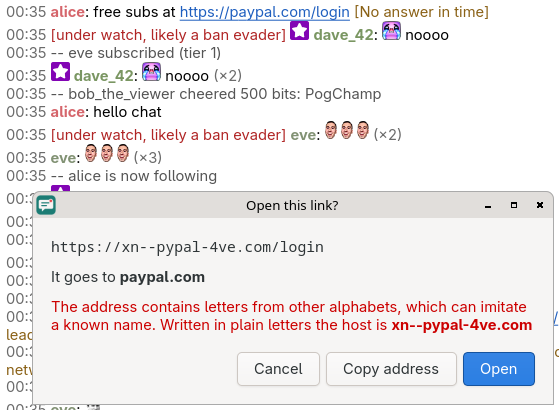
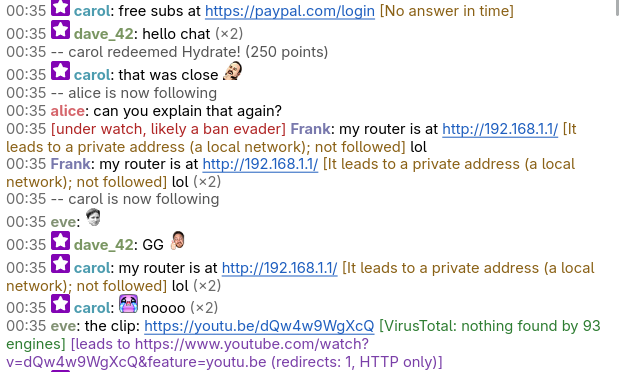
A link opens only after you have seen its whole address, with the host emphasized; a look-alike letter shows up in punycode. Where it leads can be found out without opening it, and never by going into your own network. VirusTotal is asked only about a link you pick, with your own key.
Your login is kept close
You log in with a code at twitch.tv/activate, so Liveside never sees your password. The token is in a file only you can read, and your own bots never get it: Liveside speaks for them.
Nothing goes where it need not
Chat goes to Twitch. Emote providers learn which channels you read, and that can be switched off, as can the local chat log. No telemetry, no crash reports, no update check.
You can check it
/privacy lists what is sent where and what is stored, from the settings in use, and docs/privacy.md says how to verify it yourself.
What it does
Chat
Several channels at once, side by side or in windows of their own. Emotes from Twitch, 7TV, BetterTTV and FrankerFaceZ, animated ones included. Replies, mentions, search, whispers, Shared Chat, and a local log, so a channel you rejoin comes back with its recent lines.
Your own rules
Highlight, ignore and filter rules in Chatty's syntax, an address book, custom commands, hotkeys, and marking what somebody keeps repeating.
Moderation
Timeouts, bans, warnings, room modes, moderators and VIPs, Shield Mode, blocked terms and suspicious users. AutoMod's queue, unban requests and the moderation log in one Review panel.
For broadcasters
Polls, predictions, channel point rewards and their queue. Title, category, tags and schedule. Raids, shoutouts, markers, ad breaks and clips, and a graph of viewers over the stream.
Notifications
For mentions, whispers, channels going live and messages waiting for a moderator, with sounds. Streamlink to watch the stream, and a Stream Chat window for a broadcast.
Languages
English and Czech, and machine translations into Spanish, Russian, Ukrainian, Esperanto, Greek, Korean, Japanese, Chinese, Thai, Vietnamese and Arabic.
For moderators and broadcasters
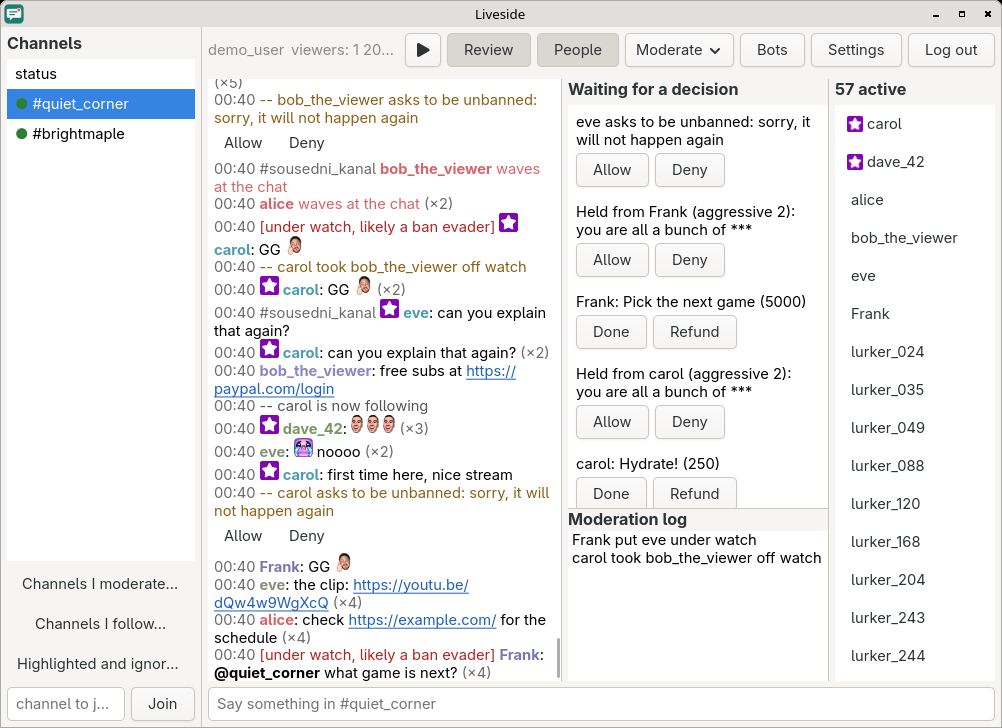
What waits for a decision is in one place, beside the chat rather than in a browser tab: messages held by AutoMod, unban requests and channel point redemptions, with the moderation log under them.
The channel's own tools, from polls and predictions to raids and the schedule, are in the Moderate menu, and Twitch's suspicious users are marked in the chat, as help against ban evaders.
A window, a terminal, a daemon
liveside-tui does what the window does, in a terminal and over SSH, and reads well on a dark background or a light one.
liveside-daemon keeps the chat running without a frontend. Start the window or the terminal with --daemon to attach to it, and several can be attached at once; a systemd user service for it comes along.

Bots of your own
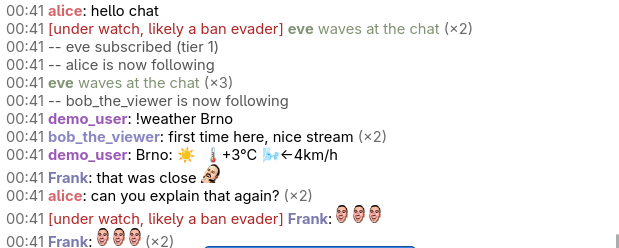
A bot is a program Liveside starts and talks to, in any language, speaking JSON one line at a time. It needs no login of its own and never sees yours: Liveside reads the chat for it and says what it asks. docs/bots.md has how, and an example that answers with the weather.
Install
Flathub and the AUR are planned for the first release. Until then, build it from source.
From source
You need Rust 1.98 or newer (from rustup; most distributions carry an older one) and GTK 4.10 or newer for development: libgtk-4-dev on Debian and Ubuntu, gtk4-devel on Fedora, gtk4 on Arch Linux.
git clone https://github.com/foxkyong/liveside
cd liveside
cargo build --release
target/release/liveside-gui --demo
The programs are liveside-gui, liveside-tui and liveside-daemon. On Arch Linux, packaging/arch/PKGBUILD makes a package with the launcher entry and the icon.
First steps
- Start
liveside-gui, orliveside-tuiin a terminal. - Press Log in (in the terminal,
/login) and enter the code it shows at twitch.tv/activate. - Type a channel's name under the channel list and press Join (in the terminal,
/join name). - To look around without a Twitch account, start it with
--demo.
docs/usage.md has the keys, the commands and every setting.
Where it runs
| Desktop | Tried on |
|---|---|
| labwc (Wayland) | Arch Linux |
| KDE Plasma 6.8 (Wayland) | Arch Linux |
| GNOME 50 (Wayland) | Ubuntu 26.04 |
| Cinnamon 6.6 (X11) | Linux Mint 22.3 |
| COSMIC 1.10 (Wayland) | CachyOS |
| Xfce 4.20 (X11) | Debian 13 |
| Windows 11 | through WSL2, with Debian 13 inside, without notifications |
On macOS it builds with Homebrew and runs, but notifications do not work there yet.